Saiba Mais
Make.com Pricing 2026: Free vs Paid Plans & Costs Explained

Make.com pricing in 2026 delivers flexible plans designed for operations teams, developers, and businesses of all sizes. The platform’s cost structure balances free access for basic needs with scalable paid tiers for advanced automation, data processing, and team collaboration. Whether you're testing workflows or deploying enterprise-level automations, understanding the pricing tiers ensures you avoid unexpected costs while maximizing efficiency.
Quick Takeaways
Free plan includes 1,000 operations/month and basic features for testing.
Core plan starts at $9/month with 10,000 operations/month and advanced tools.
Enterprise plans offer custom pricing for unlimited operations and dedicated support.
Hidden costs may apply for high-volume usage or custom integrations.
Zapier comparison: Make.com often costs less for complex workflows.
---
What is Make.com Pricing? Core Plans & Cost Structure
Make.com operates on a usage-based pricing model, where costs scale with the number of operations performed each month. An operation refers to any action the platform executes, such as transferring data between apps, sending notifications, or processing files. This model ensures teams only pay for what they use, making it ideal for startups and growing businesses.
Key Pricing Components
Operations: The primary cost driver. Each task (e.g., API call, data transformation) counts as an operation.
Users: Some plans include multiple team members; others charge per user.
Data Volume: Larger data transfers may incur additional fees.
Custom Integrations: Complex workflows requiring custom code may need enterprise pricing.
Why this matters: Unlike flat-rate tools, Make.com’s pricing adapts to your team’s actual workload. For example, a marketing team running 5,000 operations/month won’t overpay for unused capacity.
---
Make.com Free Plan vs Paid Plans: Key Differences
The free plan is ideal for individuals or small teams testing automations, but it comes with strict limits. Here’s how it compares to paid tiers:
Feature | Free Plan | Core Plan ($9/month) | Pro Plan ($16/month) |
|---|---|---|---|
Operations/month | 1,000 | 10,000 | 20,000 |
Data Storage | 100 MB | 1 GB | 2 GB |
Team Members | 1 | 1 | 1 |
Webhooks | 100/month | 1,000/month | 2,000/month |
Custom Apps | Limited | Unlimited | Unlimited |
Who it’s for: The free plan is perfect for one-off tasks or learning the platform, but teams handling daily automations will quickly hit limits. Paid plans unlock scalability, higher operation counts, and priority support.
---
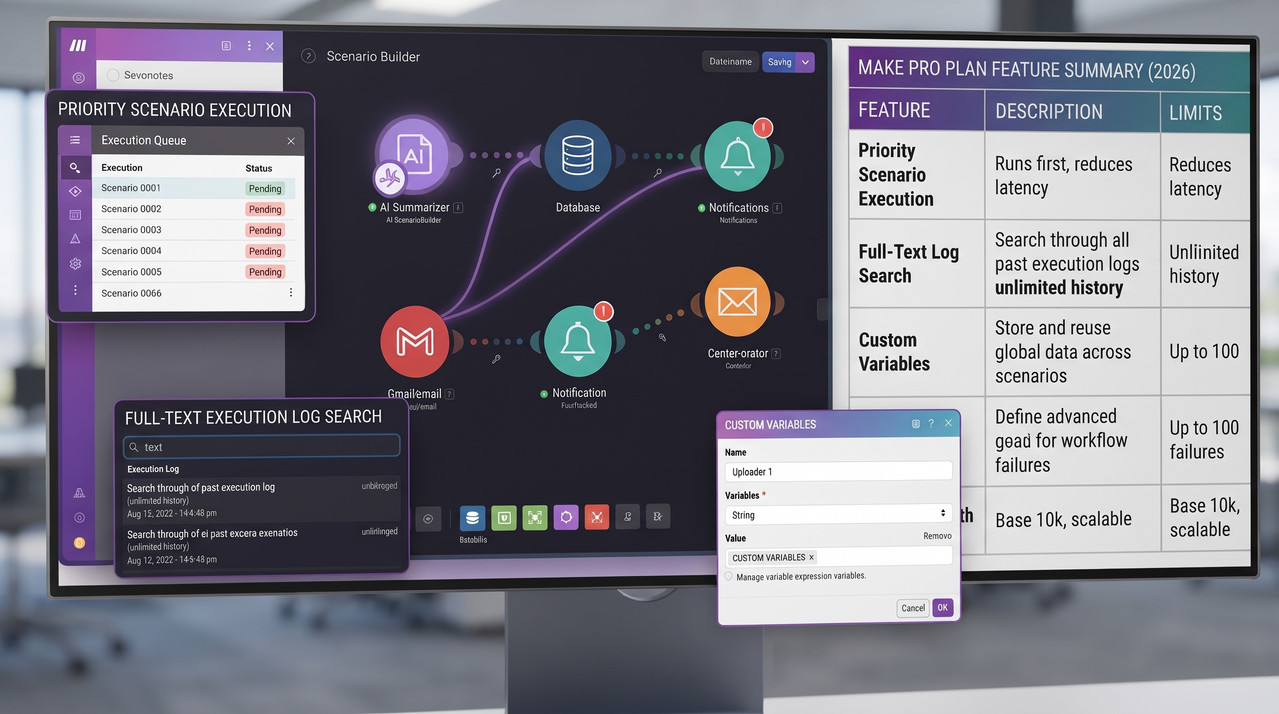
Make.com Pricing Tiers in 2026: Complete Breakdown
Make.com’s 2026 pricing tiers are structured to match different operational needs, from solo users to enterprise teams. Here’s the full breakdown:
1. Free Plan
Best for: Individuals or small teams testing workflows.
Limitations: 1,000 operations/month, 100 MB storage, single user.
What’s included: Basic automation builder, limited integrations, and community support.
2. Core Plan ($9/month)
Best for: Small businesses or freelancers needing reliable automations.
Includes: 10,000 operations/month, 1 GB storage, 1 team member.
Key features: Advanced scheduling, error handling, and 500+ integrations.
3. Pro Plan ($16/month)
Best for: Growing teams managing complex workflows.
Includes: 20,000 operations/month, 2 GB storage, 1 team member.
Key features: Priority support, custom app integrations, and 2x faster execution.
4. Teams Plan ($29/user/month)
Best for: Departments or agencies with multiple collaborators.
Includes: 30,000 operations/month/user, 5 GB storage/user, 5+ team members.
Key features: Role-based access, shared folders, and audit logs.
5. Enterprise Plan (Custom Pricing)
Best for: Large organizations with high-volume needs.
Includes: Unlimited operations, dedicated account manager, and 24/7 support.
Customization: Tailored SLAs, onboarding, and security compliance.
Pro tip: Teams with high data volumes should compare the Teams plan against enterprise options—sometimes bulk discounts apply.
---
How Much Does Make.com Cost? Pricing by User & Usage
The total cost of Make.com depends on three factors: plan tier, number of users, and operation volume. Here’s a realistic cost projection for common use cases:
Scenario 1: Solo User (Freelancer)
Plan: Core ($9/month)
Operations: ~3,000/month
Estimated Cost: $9/month
Why it works: The Core plan covers daily tasks without overpaying for unused capacity.
Scenario 2: Small Business Team (3 Users)
Plan: Teams ($29/user/month)
Operations: ~15,000/month
Estimated Cost: $87/month
Savings: Sharing operations across users reduces per-user costs.
Scenario 3: High-Volume Agency (10 Users)
Plan: Enterprise (Custom)
Operations: ~100,000/month
Estimated Cost: $500–$1,500/month
Why it works: Enterprise plans offer bulk pricing for large-scale automations.
Cost-saving tip: Monitor your operation volume monthly. If you consistently exceed your plan’s limits, upgrading early avoids overage fees.
---
Make.com vs Zapier Pricing: Which Automation Tool Costs Less?
Choosing between Make.com and Zapier often comes down to pricing, especially for teams handling complex workflows. Here’s a direct comparison:
Feature | Make.com (Core) | Zapier (Starter) |
|---|---|---|
Operations/month | 10,000 | 750 |
Price/month | $9 | $19.99 |
Integrations | 500+ | 5,000+ |
Data Handling | Better for large files | Limited file size |
Custom Logic | Built-in | Requires paid plans |
Key insight: For high-volume operations, Make.com is significantly cheaper. Zapier’s pricing scales faster with usage, making it less cost-effective for teams exceeding 1,000 operations/month.
When to choose Zapier: If you need 5,000+ integrations or simpler workflows, Zapier’s broader app ecosystem may justify the higher cost.
---
Which Make.com Plan is Best for My Operations in 2026?
Selecting the right plan hinges on three questions:
What’s your monthly operation volume?
Under 1,000? Start with the free plan.
1,000–20,000? The Core or Pro plan fits best.
Over 30,000? Teams or Enterprise plans are necessary.
How many team members need access?
Single user? Core/Pro plans suffice.
Multiple users? Teams plan adds collaboration tools.
Do you need custom integrations?
Standard apps? All plans cover common tools.
Custom apps? Enterprise plans unlock developer features.
Real-world example: A marketing agency using Make.com to automate client reporting might start with the Teams plan ($29/user) to share workflows across 4 team members, costing $116/month—far cheaper than hiring a developer to build the same workflows.
---
Make.com Operations Limits: What You Need to Know
Make.com’s operations limits are the primary constraint in the free and paid plans. Exceeding these limits triggers overage fees or temporarily disables your account. Here’s what to watch:
Common Limits by Plan
Free: 1,000 operations/month
Core: 10,000 operations/month
Pro: 20,000 operations/month
Teams: 30,000 operations/month/user
How to Stay Under Limits
Optimize workflows: Use batch processing to combine multiple operations into one.
Schedule tasks: Run automations during off-peak hours to avoid spikes.
Monitor usage: Set up alerts in your Make.com dashboard to track operations in real time.
Warning: High-volume users (e.g., e-commerce stores syncing orders) may need the Teams or Enterprise plan to avoid disruptions during peak seasons.
---
Make.com Custom Plans & Enterprise Pricing Options
For organizations with unique needs, Make.com offers custom plans tailored to specific requirements. These plans are ideal for:
Unlimited operations: No caps on monthly tasks.
Dedicated support: 24/7 priority assistance.
Security compliance: HIPAA, GDPR, or SOC 2 certifications.
Custom integrations: API access for proprietary tools.
How to Request a Custom Plan
Contact Make.com’s sales team via their website.
Provide details on your operation volume, team size, and security needs.
Negotiate pricing based on your usage patterns.
Enterprise tip: Custom plans often include onboarding sessions and dedicated account managers, which can save months of setup time.
---
Make.com Pricing: Hidden Costs to Watch in 2026
While Make.com’s pricing is transparent, hidden costs can sneak up on teams. Be aware of these potential expenses:
.png)
1. Overage Fees
Cost: $0.001–$0.005 per extra operation.
Trigger: Exceeding your monthly limit.
Example: 1,000 extra operations could add $1–$5 to your bill.
2. Custom Integration Development
Cost: $500–$5,000 per integration.
Trigger: Needing to connect a proprietary app.
Tip: Check Make.com’s app directory first—many tools are already supported.
3. Data Storage Upgrades
Cost: $10–$50/month for additional storage.
Trigger: Exceeding 1 GB (Core) or 5 GB (Teams) of storage.
4. Premium Support Tiers
Cost: $50–$200/month for faster response times.
Trigger: Needing SLA-backed support for critical workflows.
Pro advice: Always set up budget alerts in your Make.com account to avoid surprises.
---
Does Make.com Offer a Free Trial or Demo in 2026?
Yes! Make.com provides two ways to test its platform before committing to a paid plan:
1. Free Plan
Duration: No expiration date.
Limits: 1,000 operations/month, 100 MB storage.
Best for: Individuals testing basic workflows.
2. Paid Plan Trial
Duration: 14 days for Core, Pro, or Teams plans.
Cost: Free during the trial period.
What’s included: Full access to all features, including premium integrations.
3. Live Demos & Webinars
Offered: Monthly live demos and on-demand webinars.
How to join: Register via Make.com’s events page.
Tip: Use the 14-day trial to build and test a workflow that reflects your real-world needs. This helps you choose the right plan with confidence.
---
How to Choose the Right Make.com Plan for Your Team
Selecting the ideal Make.com plan requires balancing cost, features, and scalability. Follow this step-by-step guide:
Step 1: Audit Your Workflow Needs
List all automations you plan to build (e.g., CRM updates, email triggers, file transfers).
Count operations for each workflow. A simple CRM sync might use 10 operations; a complex order processing system could use 1,000.
Step 2: Estimate Monthly Volume
Add up operations for all workflows.
Add 20% buffer for unexpected spikes (e.g., holiday sales).
Example: 5,000 operations + 1,000 buffer = 6,000 operations/month (Core plan covers this easily).
Step 3: Compare Plans
Plan | Operations | Cost | Best For |
|---|---|---|---|
Free | 1,000 | $0 | Testing, solo users |
Core | 10,000 | $9 | Small teams, startups |
Pro | 20,000 | $16 | Growing businesses |
Teams | 30,000 | $29/user | Departments, agencies |
Enterprise | Unlimited | Custom | Large organizations |
Step 4: Start Small, Scale Up
Begin with the free or Core plan to validate your workflows.
Monitor usage in the Make.com dashboard.
Upgrade only when necessary—avoid paying for unused capacity.
Final tip: If you’re unsure, start with the Core plan ($9/month). It’s affordable, scales well, and includes nearly all features needed for most use cases.
---
Make.com Pricing FAQs
Is Make.com’s free plan really free?
Yes, Make.com’s free plan includes 1,000 operations/month, 100 MB storage, and access to basic features. However, it’s limited to one user and lacks advanced tools like priority support or custom integrations. For teams needing more, paid plans start at $9/month.
Can I pay annually for Make.com?
Yes, Make.com offers annual billing for all paid plans, which includes a 10–20% discount compared to monthly payments. For example, the Core plan costs $9/month or $99/year—saving $18 over 12 months.
Does Make.com charge per user?
No, only the Teams plan charges per user ($29/user/month). All other plans (Core, Pro, Enterprise) are priced per account, regardless of the number of collaborators. This makes Make.com cost-effective for small teams sharing a single account.
What happens if I exceed my operation limit?
If you exceed your monthly operations limit, Make.com temporarily disables your account until the next billing cycle. You’ll need to upgrade your plan or wait for the reset to resume operations. Pro tip: Set up usage alerts in your dashboard to avoid disruptions.
Is Make.com cheaper than Zapier for automation?
Yes, for most use cases. Make.com’s Core plan ($9/month) includes 10,000 operations, while Zapier’s Starter plan ($19.99/month) only offers 750 operations. For teams handling high-volume workflows, Make.com can save 50–80% compared to Zapier.
Can I downgrade my Make.com plan anytime?
Yes, you can downgrade or upgrade your plan at any time from your account dashboard. Changes take effect at the next billing cycle, and you’ll receive a prorated refund if you’ve overpaid. This flexibility ensures you only pay for what you need.
Does Make.com offer discounts for nonprofits or students?
Yes, Make.com provides discounted plans for nonprofits and educational institutions. Contact their sales team to learn about eligibility and pricing. Common discounts range from 10–30% off standard plans.
How does Make.com handle data privacy and security?
Make.com is GDPR, SOC 2, and HIPAA compliant, with encryption for data at rest and in transit. Enterprise plans include dedicated security audits and SLA-backed uptime guarantees. For highly sensitive data, custom plans can be tailored with additional security measures.
Can I use Make.com for sales or marketing automations?
Absolutely. Make.com excels at sales and marketing automations, including CRM updates, email triggers, lead nurturing, and social media scheduling. The platform’s visual builder makes it easy to design complex workflows without coding.
What customer support options does Make.com offer?
Free Plan: Community forum and email support.
Core/Pro Plans: Email support with 24-hour response time.
Teams/Enterprise Plans: Priority email and chat support, with dedicated account managers for Enterprise users.
---
Final Verdict: Is Make.com Worth the Cost in 2026?
Make.com delivers unmatched value for teams focused on automation, cost efficiency, and scalability. Its usage-based pricing ensures you only pay for what you use, while the free plan lets you test workflows risk-free. For most businesses, the Core plan ($9/month) strikes the ideal balance between affordability and functionality.
Key takeaways:
✅ Cheaper than competitors (e.g., Zapier) for high-volume operations.
✅ Flexible plans that grow with your team’s needs.
✅ No hidden fees for standard usage (watch for custom integrations and overage).
✅ Strong free tier for individuals and small projects.
When it’s not worth it: If you need 5,000+ integrations or extremely simple workflows, Zapier’s broader app ecosystem might be a better fit. Otherwise, Make.com is a top-tier choice for operations automation.
Get Started with Make.com today and explore its powerful automation tools risk-free.